Library GUIDE
Use likes, projects, cart, and downloads
After logging in, you can use like, cart, and download from cards and detail pages. Only actions allowed for your account are shown.
- Log in to your GameSound account
Save candidates with likes
Tap the heart button on a card or detail page to save a like. The count updates immediately. Tap again to remove it.
Add a sound to a project
Project access requires a supported plan such as Pro or Ultra, or team or existing access rights. If the button is missing, check your account access.
- 1
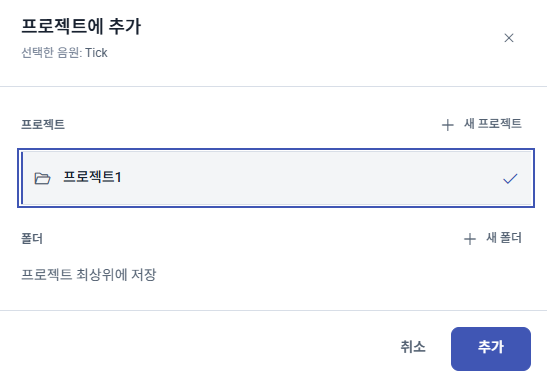
Open the picker
Select Add to project on the sound card or details page.
- 2
Choose a destination
Choose a project and, if needed, a folder.
- 3
Add the sound
Select Add.
Add one sound to cart
Users with individual plans requiring purchase will see the cart button.
- 1
Add
Tap the cart button on a card or detail page.
- 2
Confirm
When the button becomes “In cart,” tap again to open the cart.
- 3
Checkout
Review sound and price in the cart, then proceed to payment.
Download by permission level
Download is shown for purchased sounds or for account plans with download permission. After pressing, your quota and permissions are checked.
- Download purchased sounds after confirming purchase status.
- Unlimited-download plans and enabled team profile show a direct download button.
- Team and plan download has a 100-per-day limit; try again next day or buy individually if reached.