editor GUIDE
Viewing work history
Review edits in time order and compare earlier checkpoints with the current work. Restoring requires editing permission.
- GameSound sign-in and editor access
- A saved work using real-time editing
Opening work history
In a work using real-time editing, choose Change history at the top of the editor to open Work history. Select a record on the left to inspect it on the right.
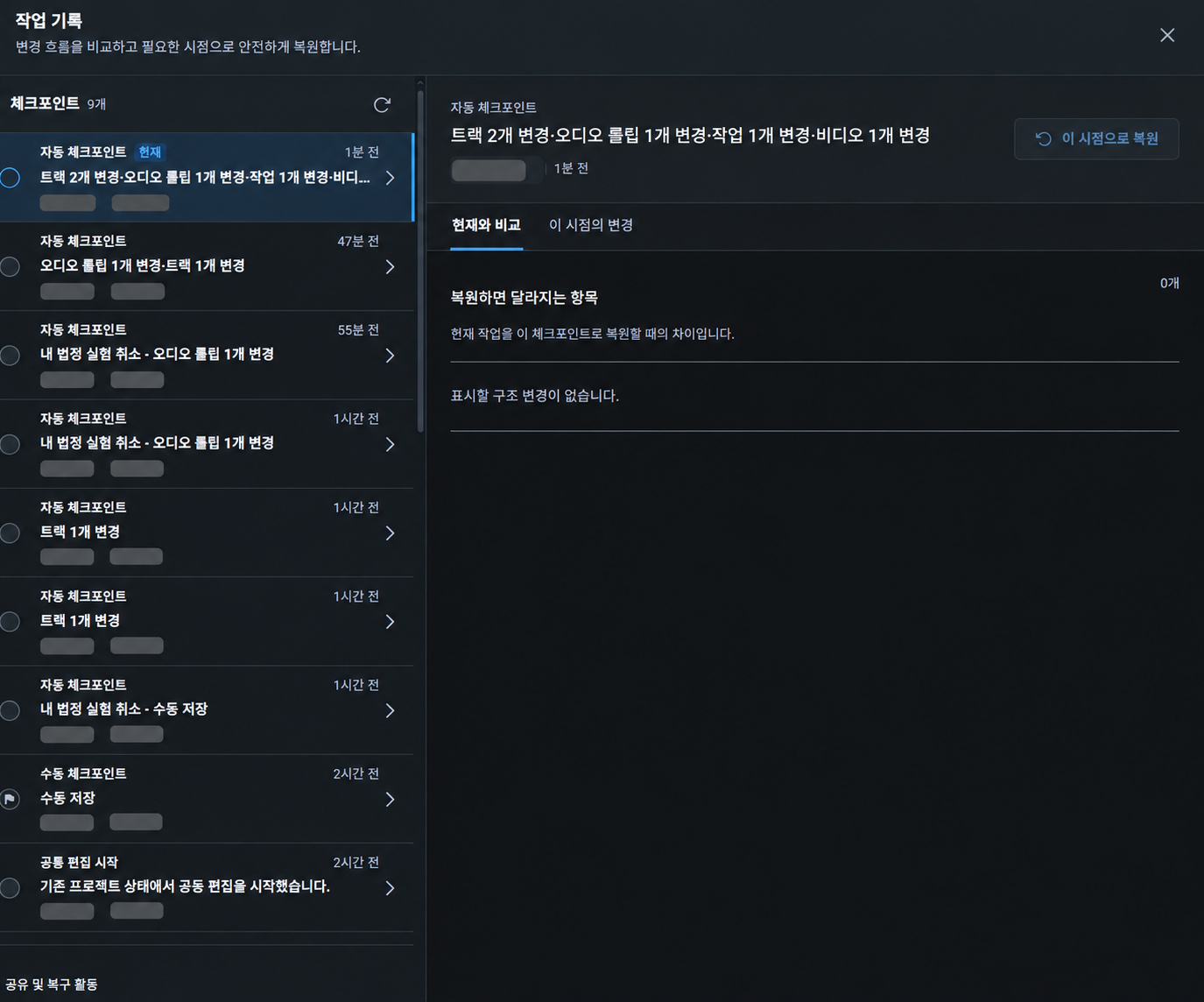
Reading checkpoints
A checkpoint records a work at a particular moment. The left list shows the total count; the latest state is marked Current.
- Type: automatic checkpoint, manual checkpoint, collaboration started and other events
- Summary: changes to tracks, audio clips and other items
- Author: name and profile picture
- Time: relative times such as 14 minutes ago, plus the current-state indicator
Comparing with the current work
Use Compare with current to inspect differences between the selected checkpoint and your current work. Sharing and recovery activity includes sharing changes, Undo and recovery-related events.
Restoring an earlier point
Select a record, choose Restore to this point, then confirm. Restoring requires edit permission; view-only participants can inspect history but cannot restore it. A restoration creates a new record without deleting earlier history.